Running aggregate function
RUNNING_SUM
To calculate the cumulative sum of a numeric column over a specified order. This function is useful for tracking the running total of a value as rows are processed in a specified order within a window or partition.
Syntax – RUNNING_SUM(aggregate column name) OVER ([PARTITION BY column name] ORDER BY Aggregate function with column name)
Example: We are calculating the cumulative sum of sales over the region.

Example Queries:
- Calculating the cumulative sum of sales over the country:
RUNNING_SUM(SUM([Retail].[Sales]))
OVER (PARTITION BY [Retail].[Country] ORDER BY SUM([Retail].[Sales])) - Calculating the cumulative Discount per Region:
RUNNING_SUM(SUM([Retail].[Order Discount]))
OVER (PARTITION BY [Retail].[Region] ORDER BY SUM([Retail].[Order Discount])) - Cumulative Shipping Cost per State:
RUNNING_SUM(SUM([Retail].[Shipping Cost]))
OVER (PARTITION BY [Retail].[State] ORDER BY SUM([Retail].[Shipping Cost])) - Cumulative Quantity Ordered per Product Category:
RUNNING_SUM(SUM([Retail].[Quantity]))
OVER (PARTITION BY [Retail].[Category] ORDER BY SUM([Retail].[Quantity])) - Cumulative Sales per Shipping mode:
RUNNING_SUM(SUM([Retail].[Sales]))
OVER (PARTITION BY [Retail].[Ship Mode] ORDER BY SUM([Retail].[Sales]))
RUNNING_AVG
To calculate the cumulative average of a numeric column over a specified order. This function is useful for tracking the running average of a value as rows are processed in a specified order within a window or partition.
Syntax – RUNNING_AVG(aggregate column name) OVER ([PARTITON BY column name] ORDER BY Aggregate function with column name)
Example: We are calculating the cumulative average of sales over the region.

Example Queries:
- Calculating the running average of sales over the country:
RUNNING_AVG(AVG([Retail].[Sales]))
OVER (PARTITION BY [Retail].[Country] ORDER BY AVG([Retail].[Sales])) - Calculating the running average Discount per Region:
RUNNING_AVG(AVG([Retail].[Order Discount]))
OVER (PARTITION BY [Retail].[Region] ORDER BY AVG([Retail].[Order Discount])) - Cumulative running average Shipping Cost per State.
RUNNING_AVG(AVG([Retail].[Shipping Cost]))
OVER (PARTITION BY [Retail].[State] ORDER BY AVG([Retail].[Shipping Cost])) - Running Average Quantity Ordered per Product Category.
RUNNING_AVG(AVG([Retail].[Quantity]))
OVER (PARTITION BY [Retail].[Category] ORDER BY AVG([Retail].[Quantity])) - Running Average Sales per Shipping mode.
RUNNING_AVG(AVG([Retail].[Sales]))
OVER (PARTITION BY [Retail].[Ship Mode] ORDER BY AVG([Retail].[Sales]))
RUNNING_MAX
To calculate the running maximum (or cumulative maximum) of a numeric column over a specified order. This function is used to find the maximum value as rows are processed in a specified order within a window or partition.
Syntax – RUNNING_MAX(aggregate column name) OVER ([PARTITION BY column name] ORDER BY Aggregate function with column name)
Example: We are calculating the cumulative maximum of sales over the region.

Example Queries:
- Calculating the running maximum sales over the country:
RUNNING_MAX(MAX([Retail].[Sales]))
OVER (PARTITION BY [Retail].[Country] ORDER BY MAX([Retail].[Sales])) - Calculating the running maximum Discount per Region:
RUNNING_MAX(MAX([Retail].[Order Discount]))
OVER (PARTITION BY [Retail].[Region] ORDER BY MAX([Retail].[Order Discount])) - Running Maximum Shipping Cost per State:
RUNNING_MAX(MAX([Retail].[Shipping Cost]))
OVER (PARTITION BY [Retail].[State] ORDER BY MAX([Retail].[Shipping Cost])) - Running Maximum Quantity Ordered per Product Category:
RUNNING_MAX(MAX([Retail].[Quantity]))
OVER (PARTITION BY [Retail].[Category] ORDER BY MAX([Retail].[Quantity])) - Running Maximum Sales per Shipping mode.
RUNNING_MAX(MAX([Retail].[Sales]))
OVER (PARTITION BY [Retail].[Ship Mode] ORDER BY MAX([Retail].[Sales]))
RUNNING_MIN
To calculate the running maximum (or cumulative maximum) of a numeric column over a specified order. This function is used to find the maximum value as rows are processed in a specified order within a window or partition.
Syntax – RUNNING_MIN(aggregate column name) OVER ([PARTITION BY column name] ORDER BY Aggregate function with column name)
Example: We are calculating the cumulative minimum of sales over the region.

Example Queries:
- Calculating the running minimum sales over the country:
RUNNING_MIN(MIN([Retail].[Sales]))
OVER (PARTITION BY [Retail].[Country] ORDER BY MIN([Retail].[Sales])) - Calculating the running minimum Discount per Region:
RUNNING_MIN([Retail].[Order Discount])
OVER (PARTITION BY [Retail].[Region] ORDER BY MIN([Retail].[Order Discount])) - Running Minimum Shipping Cost per State:
RUNNING_MIN(MIN([Retail].[Shipping Cost]))
OVER (PARTITION BY [Retail].[State] ORDER BY MIN([Retail].[Shipping Cost])) - Running Minimum Quantity Ordered per Product Category:
RUNNING_MIN(MIN([Retail].[Quantity]))
OVER (PARTITION BY [Retail].[Category] ORDER BY MIN([Retail].[Quantity])) - Running Minimum Sales per Shipping mode:
RUNNING_MIN(MIN([Retail].[Sales]))
OVER (PARTITION BY [Retail].[Ship Mode] ORDER BY MIN([Retail].[Sales]))
RUNNING_VAR
To calculate the running minimum (or cumulative minimum) of a numeric column over a specified order. This function is used to find the minimum value as rows are processed in a specified order within a window or partition.
Syntax – RUNNING_VAR(aggregate column name) OVER ([PARTITION BY column name] ORDER BY Aggregate function with column name)
Example: We are calculating the cumulative variance of sales over the region.

Example Queries:
- Calculating the cumulative running variance sales over the country:
RUNNING_VAR(VAR([Retail].[Sales]))
OVER (PARTITION BY [Retail].[Country] ORDER BY VAR([Retail].[Sales])) - Calculating the cumulative running variance of Discount per Region:
RUNNING_VAR(VAR[Retail].[Order Discount])
OVER (PARTITION BY [Retail].[Region] ORDER BY VAR([Retail].[Order Discount])) - Running Variance Shipping Cost per State:
RUNNING_VAR(VAR([Retail].[Shipping Cost]))
OVER (PARTITION BY [Retail].[State] ORDER BY VAR([Retail].[Shipping Cost])) - Running Variance of Quantity Ordered per Product Category:
RUNNING_VAR(VAR([Retail].[Quantity]))
OVER (PARTITION BY [Retail].[Category] ORDER BY VAR([Retail].[Quantity])) - Running Variance Sales per Shipping mode:
RUNNING_VAR(VAR([Retail].[Sales]))
OVER (PARTITION BY [Retail].[Ship Mode] ORDER BY VAR([Retail].[Sales]))
RUNNING_STDDEV
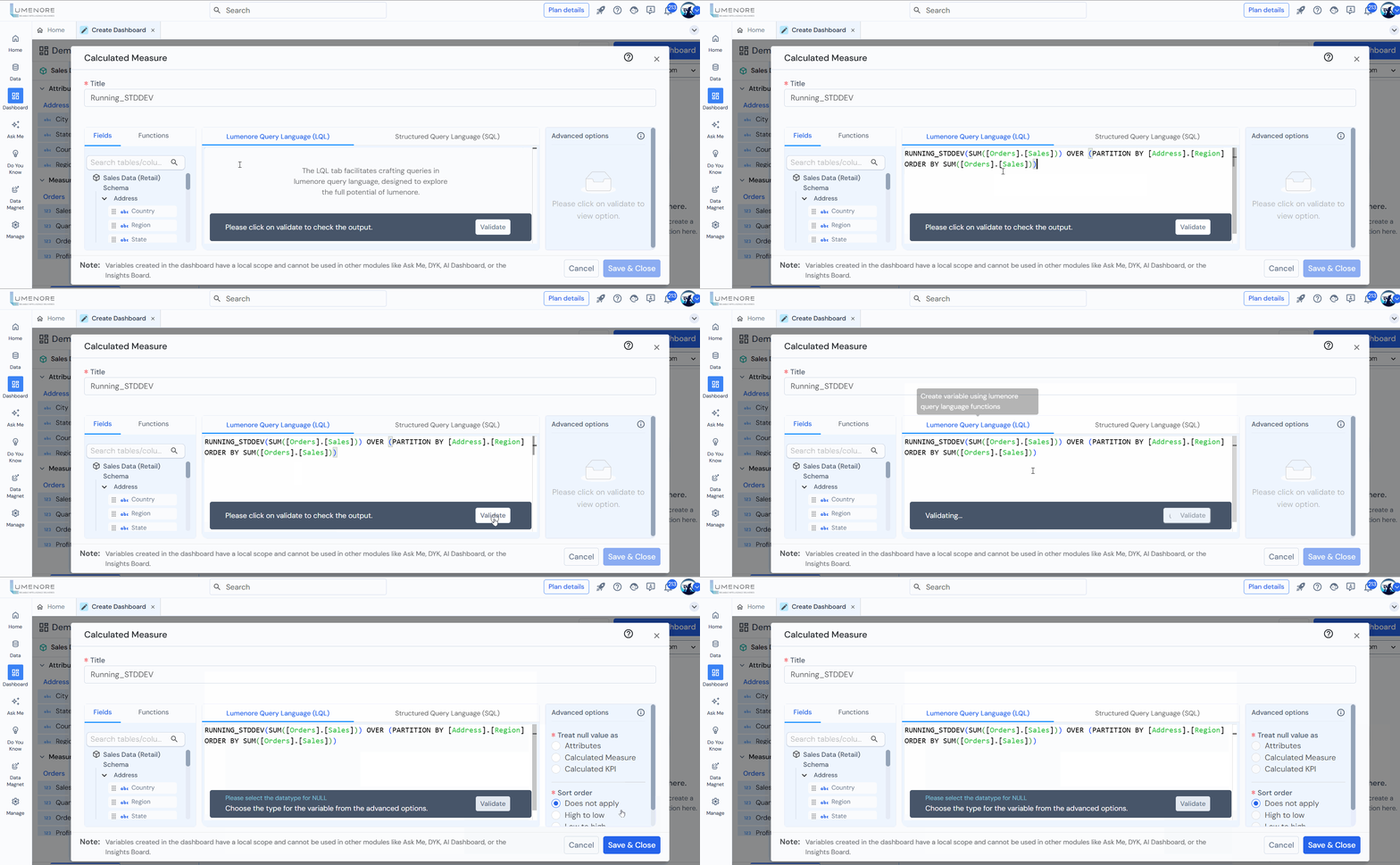
To calculate the running or cumulative variance for a numeric column over a specified order, you may need to use a combination of existing functions and the window function framework available in your specific database system.
Syntax – RUNNING_STDDEV(aggregate column name) OVER ([PARTITION BY column name] ORDER BY Aggregate function with column name)
Example: We are calculating the cumulative standard deviation of sales over the region.
RUNNING_COUNT
To calculate the running count.
Syntax – RUNNING_COUNT(aggregate column name) OVER ([PARTITION BY column name] ORDER BY Aggregate function with column name)
Example: We are calculating the cumulative count of sales over the region.

Example Queries:
- Calculating the cumulative running Count sales over the country:
RUNNING_COUNT(COUNT([Retail].[Sales]))
OVER (PARTITION BY [Retail].[Country] ORDER BY COUNT([Retail].[Sales])) - Calculating the cumulative running count of Discount per Region:
RUNNING_COUNT([Retail].[Order Discount])
OVER (PARTITION BY [Retail].[Region] ORDER BY COUNT([Retail].[Order Discount])) - Running Count Shipping Cost per State:
RUNNING_COUNT(COUNT([Retail].[Shipping Cost]))
OVER (PARTITION BY [Retail].[State] ORDER BY COUNT([Retail].[Shipping Cost])) - Running Count of Quantity Ordered per Product Category:
RUNNING_COUNT(COUNT([Retail].[Quantity]))
OVER (PARTITION BY [Retail].[Category] ORDER BY COUNT([Retail].[Quantity])) - Running COUNT Sales per Shipping mode:
RUNNING_COUNT(COUNT([Retail].[Sales]))
OVER (PARTITION BY [Retail].[Ship Mode] ORDER BY COUNT([Retail].[Sales]))
Order by
- ASC
Sorting the result set in ascending order (from the lowest to the highest values).
- DESC
Sorting the result set in descending order (from the highest to the lowest values).
