Functions to handle NULL
NULL
“NULL” (sometimes written as “null”) is a special value that represents the absence of a value or a null reference. It is used to indicate that a variable or field does not have an assigned value or that the information is unknown or undefined.
Syntax – NULL
NULLIFZERO
To handle situations where division by zero might occur, preventing division errors and providing a more controlled result. This helps avoid runtime errors and allows for more graceful handling of division by zero cases.
Syntax – NULLIFZERO(numeric column)
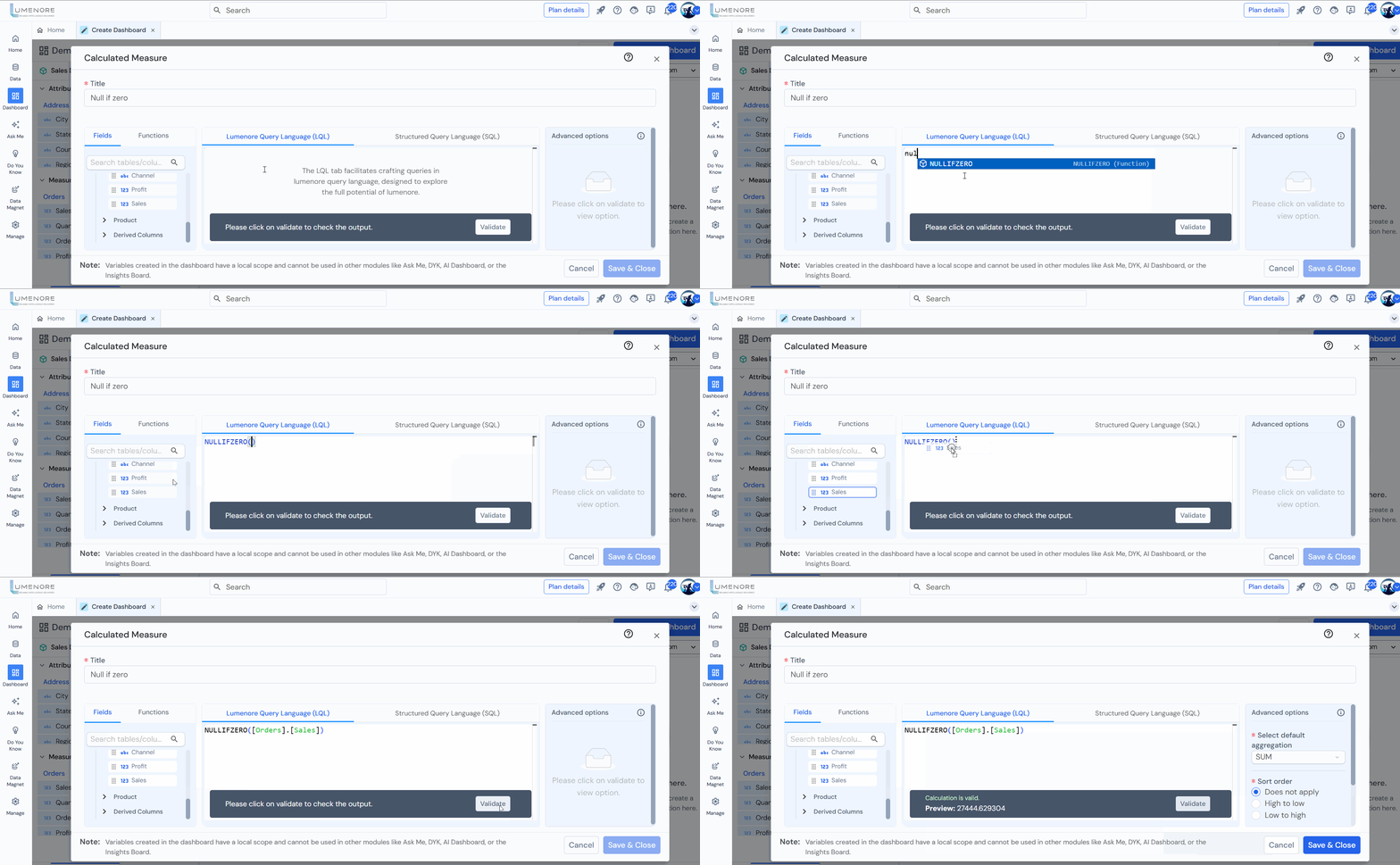
Example Queries:
- NULLIFZERO([orders].[profit])
- NULLIFZERO([orders].[sales])
- NULLIFZERO([orders].[order_discount])
- NULLIFZERO([orders].[shipping_cost])
- NULLIFZERO([product].[total_discount])
ZEROIFNULL
To handle situations where a column or expression might result in a NULL value. The purpose of ZEROIFNULL is to replace NULL values with zero (0) in the result.
Syntax – ZEROIFNULL(numeric column)

Example Queries:
- ZEROIFNULL([orders].[profit])
- ZEROIFNULL([orders].[sales])
- ZEROIFNULL([orders].[order_discount])
- ZEROIFNULL([orders].[shipping_cost])
- ZEROIFNULL([product].[total_discount])
IFNULL
To handle situations where a column or expression might result in a NULL value. The purpose of IFNULL is to provide an alternative value when the original expression evaluates to NULL.
Syntax – IFNULL(numeric column)
Example: We are applying all null functions on sales measures.

Example Queries:
- Replace NULL Sales values with 1:
IFNULL([Retail].[Sales], 1)
- Replace NULL Order Discount values with 0:
IFNULL([Order].[Order Discount], 0)
- Replace NULL Shipping Cost values with 5:
IFNULL([Order].[Shipping Cost], 5)
- Replace NULL Profit values with -1:
IFNULL([Order].[Profit], -1)
- Replace NULL Quantity values with 10:
IFNULL([Order].[Quantity], 10)
