AI Agents
AI Agents in Lumenore Ask Me
AI agents are like intelligent digital assistants built to handle specific tasks. They’re great at following clear instructions and automating routine or repetitive work.
However, these agents usually work within a fixed set of rules — they do what you tell them, step by step, but they don’t make their own decisions or adapt independently. You can think of them as helpful tools that respond to your commands, but they won’t take initiative or adapt to changing goals.
It understands the task, plans the steps, makes decisions, and collaborates with other agents to get things done, without needing you to guide every move.
Types of AI Agents
|
Agent Name |
Function |
|
Master Agent (Default) |
Acts as a router or coordinator. It guides user queries to the most appropriate specialized agent (e.g., NLQ, RCA) for accurate and efficient responses. Think of it as the intelligent gatekeeper. |
|
NLQ Agent |
Handles Natural Language Queries (NLQ). It interprets user questions like “What were the sales last quarter?” and uses plain language input to show fundamental insights and related charts. |
|
RCA Agent |
Short for Root Cause Analysis Agent. It uses AI logic to identify why a particular trend or anomaly (e.g., sales drop) occurred. This is useful for deep diagnostics and troubleshooting. |
|
Visualisation Agent |
It focuses on modifying and refining charts. Based on users’ requests, it allows users to change chart types or format colors. |
|
Data Science Agent |
Applies machine learning to uncover patterns, forecasts, trends, and anomalies. Ideal for advanced analytics. |
Key Traits of AI Agents
- Autonomy Level: AI agents have limited independence. They usually rely on human input to begin tasks and follow predefined instructions. They don’t make decisions on their own.
- Goal-Orientation: These agents are built for specific tasks, like answering a query or generating a chart. They don’t set or pursue broader goals independently—they stick to their assigned function.
- Learning Capabilities: Most AI agents do not learn from experience. If they do, it’s within strictly defined rules or training. They can’t improve or evolve unless they are updated manually.
- Complexity: They handle basic, structured tasks like displaying a chart or running a fixed report. They are outside the scope of more complex, dynamic tasks.
- Decision-Making Process: Their responses are pre-programmed. Given a specific input, they return a specific output. There’s no reasoning or adaptive thinking involved.
- Interaction with Environment: They can respond to inputs, but their reactions are fixed. They don’t adjust based on past results or changes in the environment.
- Responsiveness to Change: AI agents have a limited ability to adapt. If the situation or query changes, they typically need new instructions—they won’t adjust on their own.
Use Case
Schema: Retail
Query 1: Sales by region (NLQ Agent)
- When you ask a question like “Sales by region”, it’s recognized as a natural language query (NLQ). The Master Agent routes your question to the NLQ Agent, which analyzes the query and returns the appropriate chart or data.
- However, you won’t see any visible switch in the agent’s name; it will still show Master Agent as active. That’s because the system briefly hands off the task to the NLQ Agent behind the scenes, and once the answer is ready, it seamlessly returns to the Master Agent after completing the workflow.
- This orchestrated workflow, with each agent performing specialized tasks independently yet collaboratively, is the essence of AI Agents.

Note: If you type a query like “Pareto analysis for sales by region“, the Master Agent intelligently routes it to the Data Science Agent to perform the analysis. Once the analysis is done, the Visualization Agent formats the results into a clear, easy-to-read chart.
After completing these steps, the process returns to the Master Agent, so you’ll still see only the Master Agent as active. All this happens in the background in a smooth, single cycle so you won’t notice the switch between agents.
To see each agent in action individually, try breaking your query into smaller steps, as shown in the subsequent queries, instead of combining everything into one sentence.
Query 2: Change the chart color to red (Visualization Agent)
- The user can manually select an agent or proceed with the master agent, automatically identifying the most suitable agent.

Query 3: Change chart type to line chart (Visualization Agent)
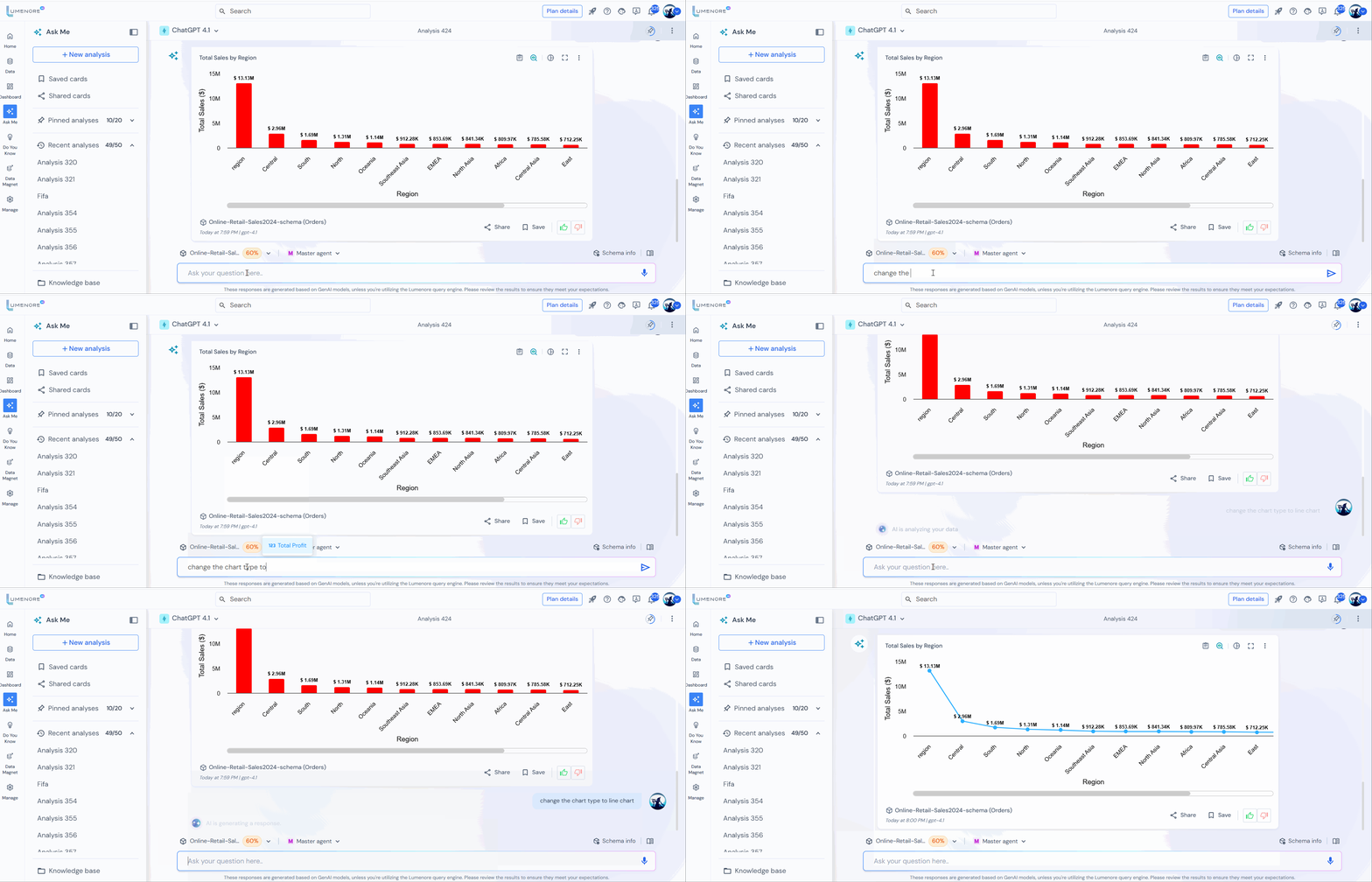
Query 4: Show Pareto analysis (Data Science Agent)
- At this stage, you’ll notice that the Master Agent has routed the query to the Data Science Agent responsible for performing the analysis. If you ever feel that the AI has selected the wrong agent or want to change direction, click “Exit Agent” to return to the Master Agent and start over.
- The user also has the option to manually select a specific agent by simply clicking on it.

- Now, the system prompts the user to provide the required numerical and categorical columns to create a Pareto chart for analysis.
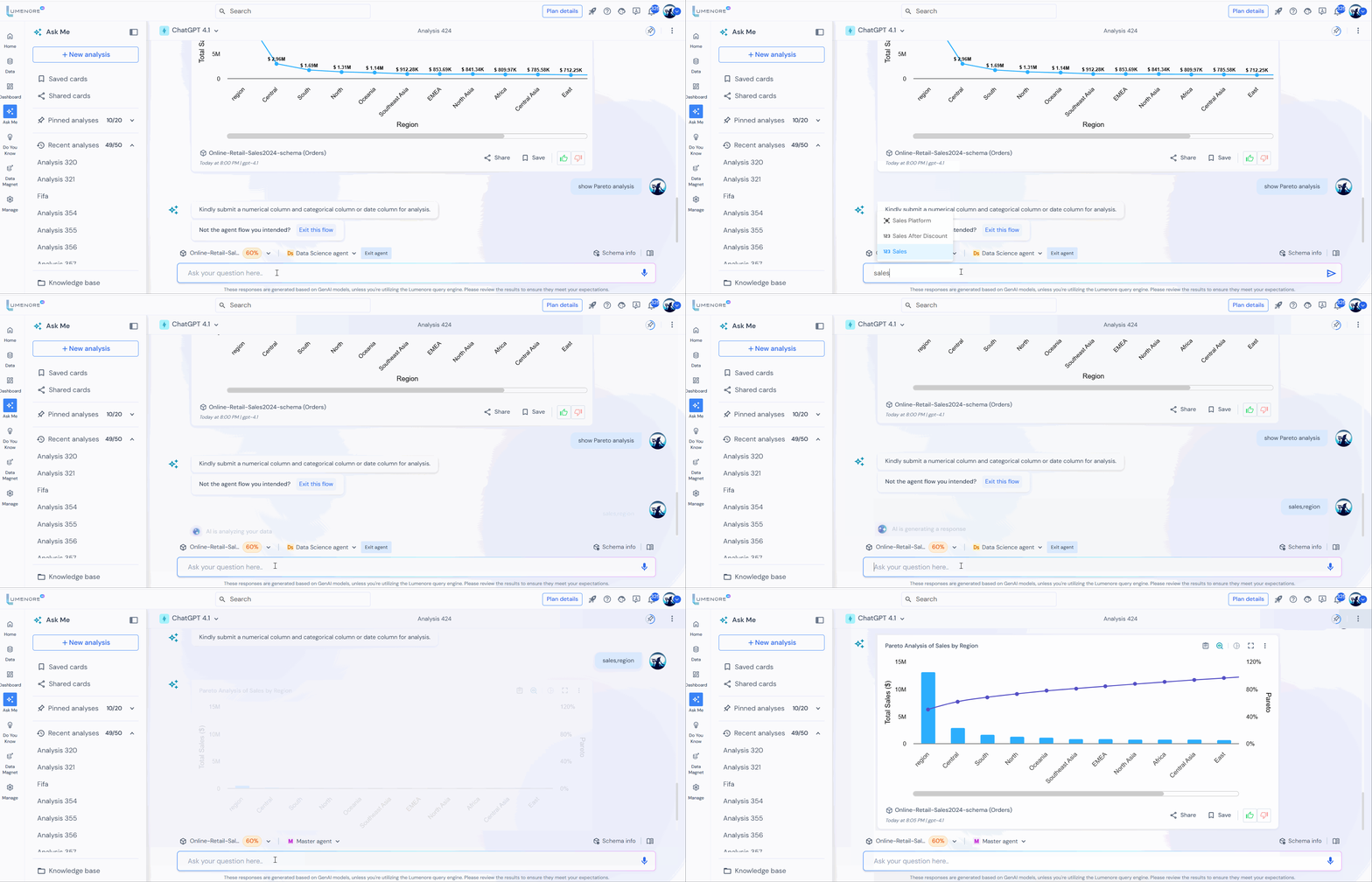
Note: If you enter “Pareto analysis,” the system will ask you to select a numerical and a categorical column—both are required for Pareto analysis.
However, suppose you change your mind and type “Forecasting analysis” right after. In that case, the system may still prompt you for the same Pareto inputs (numerical and categorical), instead of asking for the appropriate inputs needed for forecasting, such as a measure and a date column.
This occurs because the system still uses the context from the previous Pareto analysis.
To switch to a different advanced analysis, like forecasting, exit agent and enter the new analysis prompt.
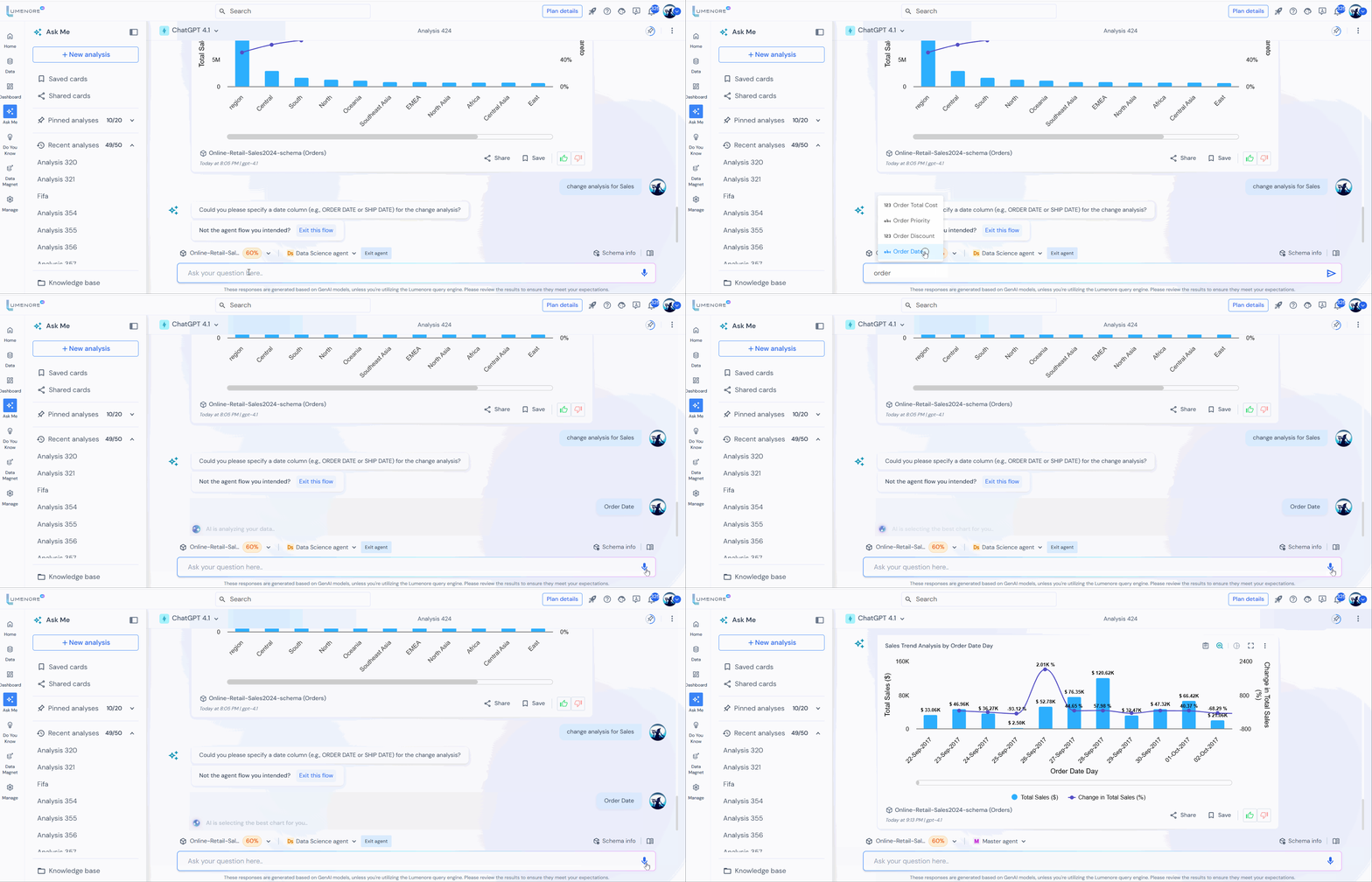
Query 5: Change analysis for sales (Data Science Agent)

- The system prompts the user to specify the date column for change analysis.
Query 6: Why are sales low in Canada? (RCA agent)
- When the user asks, “Why are sales low in Canada?”, the AI responds by requesting a relevant date field, such as Order Date or Ship Date, to proceed with the analysis. For this demonstration, we’ll select the Order Date.
- Next, the system will prompt the user to choose a date frequency, with options including weekly, monthly, quarterly, or yearly. This is followed by selecting the date range for the analysis.
- The attribute table displays the key parameters contributing to the decline in sales.
- From there, the user can continue exploring the root cause by selecting additional filters, such as Ship Mode, Channel, and others.
- The measure table highlights the correlation between various parameters and sales performance.
- For more information on RCA, click here.

Note:
- To change the period, type the required time. The RCA analysis will automatically update to reflect the new date range. For example, compare “Jan 2025” vs “Feb 2025.”
- It is recommended to follow the RCA flow outlined above without deviation, as any changes may result in errors from the AI.
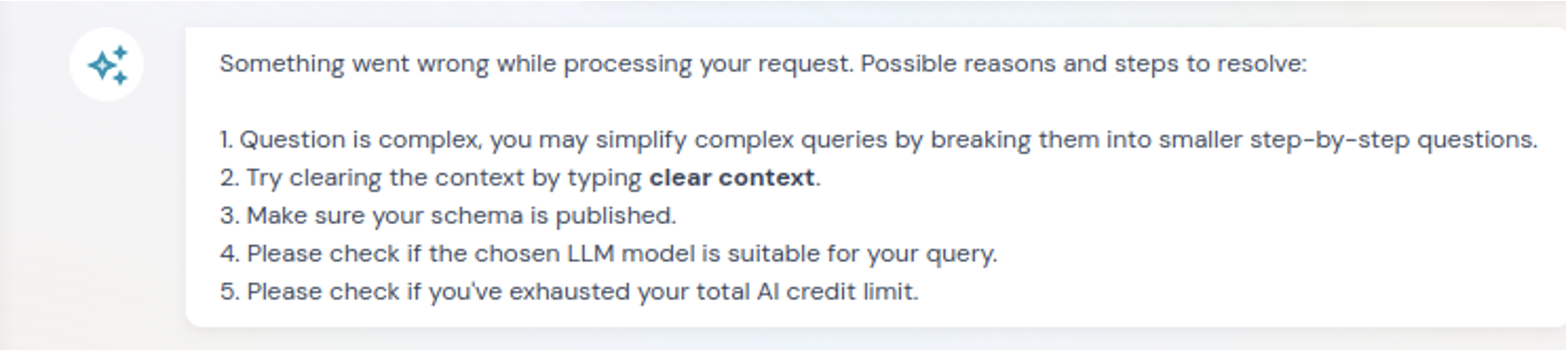
Something went wrong
If the query you entered contains an error, a message will appear as shown in the screenshot below detailing the error message, its reasons, and suggested steps to resolve it.
Exiting an Agent
The user can exit any active agent and return to the default Master Agent using any of the following methods:
- Click the “Exit Agent” button on the right when inside a specialized agent (e.g., RCA, Visualization, Data Science).
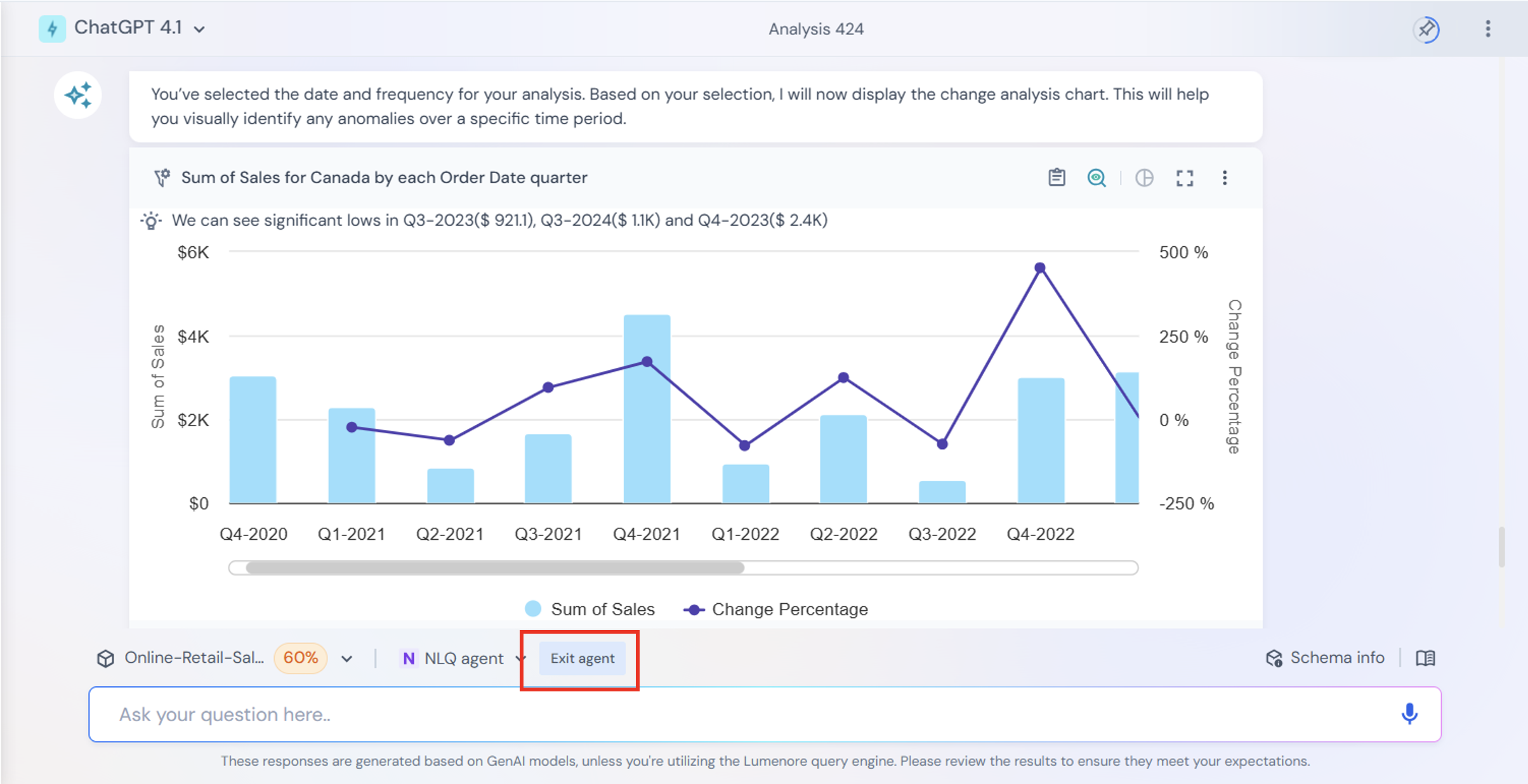
- Select “Master Agent” manually from the agent list, which will automatically exit the current agent.
- Type “Exit Agent” as a command in the prompt area, and the system will switch back to the Master Agent.
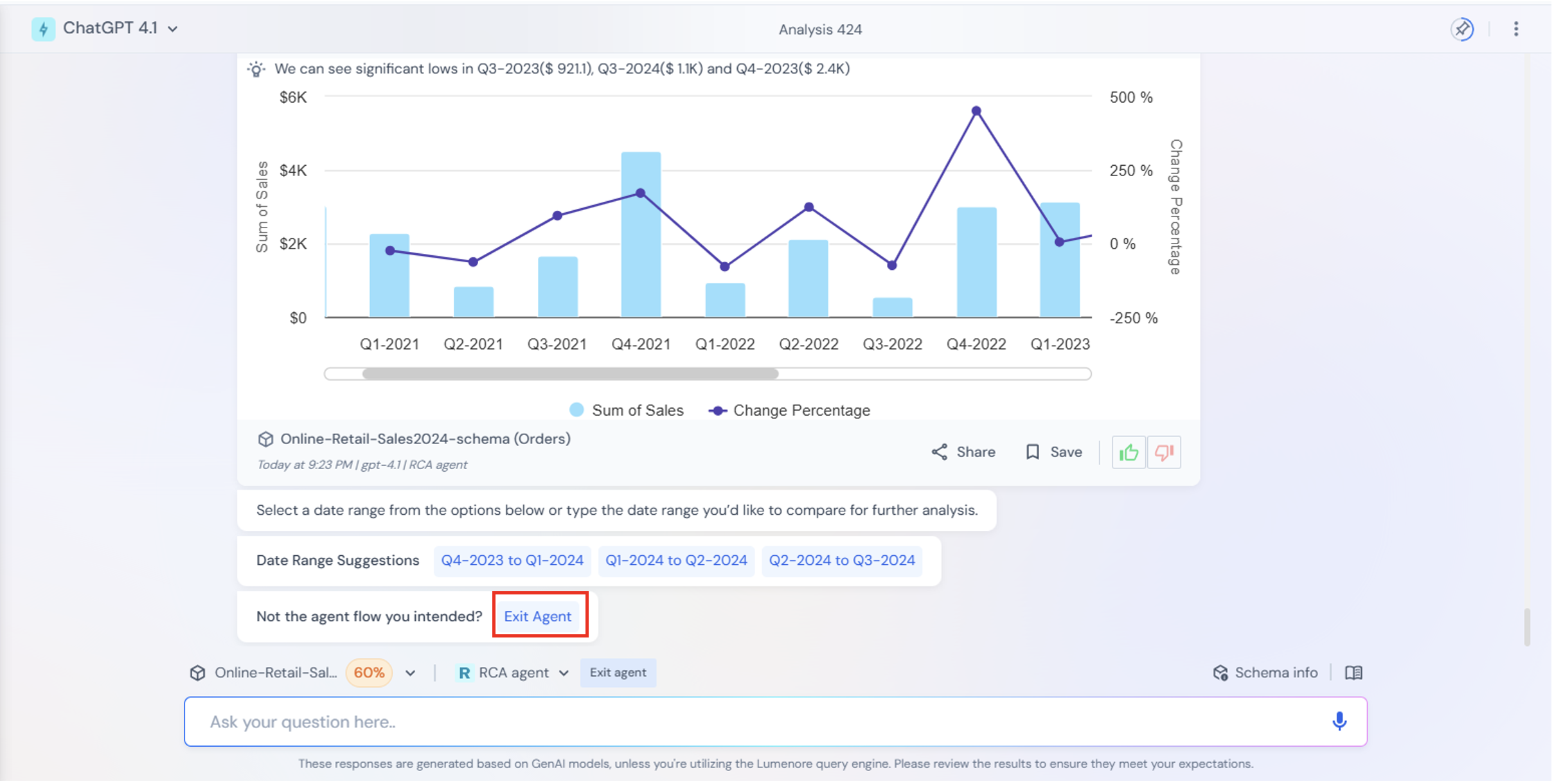
Note: When the Master Agent is already active, the “Exit Agent” button will not be displayed, since you’re already in the default agent.
Note: For better accuracy, you can first select an Agent and then run the queries, as the Master agent may sometimes redirect to the wrong agent in case of ambiguous queries.
Use Case: Overriding the Master Agent for Specific Queries
Scenario:
If a user asks a question like “What is the sales trend?”, the Master Agent may default to routing the query to the DS Agent, since trend is a data science analysis. However, if the dataset already contains a column named “Sales Trend”, the ideal agent to handle this query should be the NLQ Agent.
Resolution:
To ensure the query is interpreted correctly, the user should manually select the NLQ Agent from the dropdown and then submit the question. This will route the query appropriately and return the correct result using the existing column.
Key Insight:
This highlights the need for users to manually override the Master Agent when it selects an agent that doesn’t align with the context of the data or the intent of the question.
