Date related function
DATE_TRUNC
The DATE_TRUNC function is used in databases to truncate a date or timestamp to a specified level of precision. It essentially removes the smaller units (such as hours, minutes, and seconds) from a date, leaving only the specified larger unit. This function is often helpful for aggregating or grouping data based on larger date intervals.
Syntax – date_trunc(string, date column)
Example: We are truncating the month part of the date.

Example Queries:
- Keeps only the first day of the month, removing days and time:
DATE_TRUNC(‘month’, [Retail].[Order Date]) - Keeps only the first day of the year, removing months, days, and time:
DATE_TRUNC(‘year’, [Retail].[Ship Date]) - Keeps only the hour, removing minutes and seconds:
DATE_TRUNC(‘hour’, [Retail].[Order Date]) - Finds the start of the current week (e.g., Monday 00:00:00):
DATE_TRUNC(‘week’, [Retail].[Ship Date]) - Finds the first day of the quarter (e.g., Q1 starts in January):
DATE_TRUNC(‘quarter’, [Retail].[Order Date])
DATE_DIFF
The DATE_DIFF function is used in databases to calculate the difference between two dates or timestamps. It returns the number of units (such as years, months, days, hours, minutes, and seconds) between the specified start and end dates. This function is useful for performing date-based calculations, measuring durations, and understanding the temporal distance between two points in time.
Syntax – DATE_DIFF(string, date attribute 1, date attribute 2)
Example: We are calculating the difference between the order date and the ship date in days.

Example Queries:
- Calculates the number of days between the order date and the ship date:
DATE_DIFF(‘day’, [Retail].[Order Date], [Retail].[Ship Date]) - Returns the difference in months between the two dates:
DATE_DIFF(‘month’, [Retail].[Order Date], [Retail].[Ship Date]) - Finds the difference in years between the two dates:
DATE_DIFF(‘year’, [Retail].[Order Date], [Retail].[Ship Date]) - Finds how many hours passed between ordering and shipping:
DATE_DIFF(‘hour’, [Retail].[Order Date], [Retail].[Ship Date]) - Finds the difference in weeks between the order and ship date:
DATE_DIFF(‘week’, [Retail].[Order Date], [Retail].[Ship Date])
YEAR_DIFF
To calculate the difference in years between two dates. This function would take two date parameters as input and return the number of years between them.
Syntax – YEAR_DIFF(date attribute 1, date attribute 2)

Example Queries:
- Calculates the number of full years between the order date and the ship date:
YEAR_DIFF([Retail].[Order Date], [Retail].[Ship Date]) - Finds how many years have passed since the order was placed until today:
YEAR_DIFF([Retail].[Order Date], CURRENT_DATE) - Finds how many years have passed since the order was shipped until today:
YEAR_DIFF([Retail].[Ship Date], CURRENT_DATE) - Calculates how many years passed from the order date to a specific date:
YEAR_DIFF([Retail].[Order Date], ‘2020-01-01’) - Years Between Ship Date and a Fixed Date (2019-06-15):
YEAR_DIFF([Retail].[Ship Date], ‘2019-06-15’)
QUARTER_DIFF
To calculate the difference in quarters between two dates. This function would take two date parameters as input and return the number of quarters between years.
Syntax – QUARTER_DIFF(date attribute 1, date attribute 2)

Example Queries:
- Calculates the number of full quarters between the order date and the ship date:
QUARTER_DIFF([Retail].[Order Date], [Retail].[Ship Date]) - Finds how many quarter have passed since the order was placed until today:
QUARTER_DIFF([Retail].[Order Date], CURRENT_DATE) - Finds how many quarters have passed since the order was shipped until today:
QUARTER_DIFF([Retail].[Ship Date], CURRENT_DATE) - Calculates how many quarter passed from the order date to a specific date:
QUARTER_DIFF([Retail].[Order Date], ‘2020-01-01’) - Quarters Between Ship Date and a Fixed Date (2019-06-15):
QUARTER_DIFF([Retail].[Ship Date], ‘2019-06-15’)
MONTH_DIFF
To calculate the difference in months between the two dates. This function would take two date parameters as input and return the number of months between them.
Syntax – MONTH_DIFF(date attribute 1, date attribute 2)
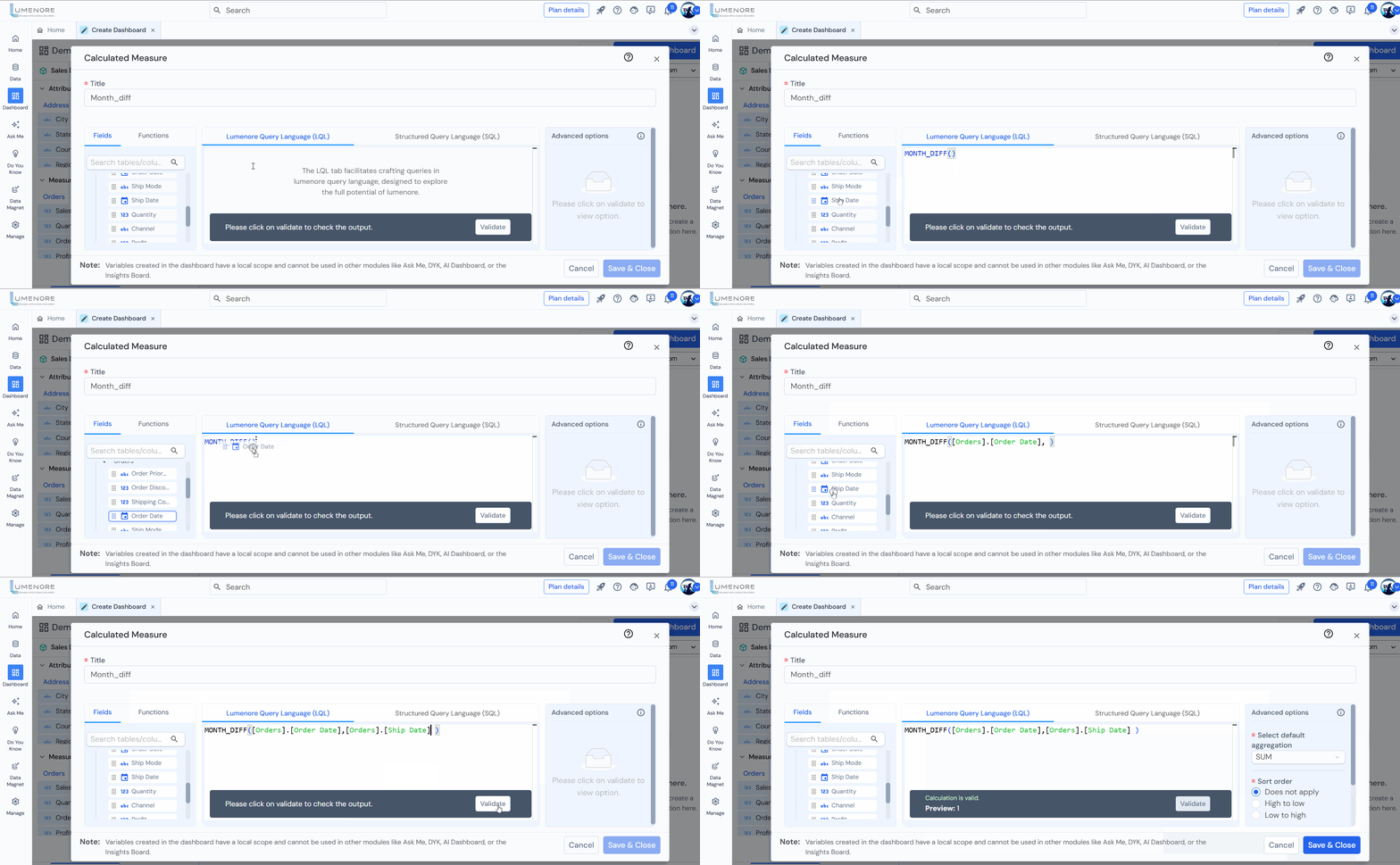
Example Queries:
- Calculates the number of full month between the order date and the ship date:
MONTH_DIFF([Retail].[Order Date], [Retail].[Ship Date]) - Finds how many months have passed since the order was placed until today:
MONTH_DIFF([Retail].[Order Date], CURRENT_DATE) - Finds how many months have passed since the order was shipped until today:
MONTH_DIFF([Retail].[Ship Date], CURRENT_DATE) - Calculates how many months passed from the order date to a specific date:
MONTH_DIFF([Retail].[Order Date], ‘2020-01-01’) - Months Between Ship Date and a Fixed Date (2019-06-15):
MONTH_DIFF([Retail].[Ship Date], ‘2019-06-15’)
WEEK_DIFF
To calculate the difference in weeks between the two dates. This function would take two date parameters as input and return the number of weeks between them.
Syntax – WEEK_DIFF(date attribute 1, date attribute 2)

Example Queries:
- Calculates the number of full week between the order date and the ship date:
WEEK_DIFF([Retail].[Order Date], [Retail].[Ship Date]) - Finds how many week have passed since the order was placed until today:
WEEK_DIFF([Retail].[Order Date], CURRENT_DATE) - Finds how many weeks have passed since the order was shipped until today:
WEEK_DIFF([Retail].[Ship Date], CURRENT_DATE) - Calculates how many weeks passed from the order date to a specific date:
WEEK_DIFF([Retail].[Order Date], ‘2020-01-01’) - Weeks Between Ship Date and a Fixed Date (2019-06-15):
WEEK_DIFF([Retail].[Ship Date], ‘2019-06-15’)
DAY_DIFF
To calculate the difference in days between two dates. This function would take two date parameters as input and return the number of days between them.
Syntax – DAY_DIFF(date attribute 1, date attribute 2)

Example Queries:
- Calculates the number of full days between the order date and the ship date:
DAY_DIFF([Retail].[Order Date], [Retail].[Ship Date]) - Finds how many days have passed since the order was placed until today:
DAY_DIFF([Retail].[Order Date], CURRENT_DATE) - Finds how many days have passed since the order was shipped until today:
DAY_DIFF([Retail].[Ship Date], CURRENT_DATE) - Calculates how many days passed from the order date to a specific date:
DAY_DIFF([Retail].[Order Date], ‘2020-01-01’) - Days Between Ship Date and a Fixed Date (2019-06-15):
DAY_DIFF([Retail].[Ship Date], ‘2019-06-15’)
YEAR
Extract the year component from a date or timestamp. Its purpose is to return the year value as an integer.
Syntax – YEAR(date attribute)

Example Queries:
- YEAR([Order Date year])
- YEAR([Ship Date year])
QUARTER
To extract the quarter component from a date or timestamp. Its purpose is to return the quarter value as an integer.
Syntax – QUARTER(date attribute)

MONTH
To extract the month component from a date or timestamp. Its purpose is to return the month value as an integer.
Syntax – MONTH(date attribute)

Example Queries:
- MONTH([Order Date month])
- MONTH([Ship Date month])
WEEK
To extract the week number from a date or timestamp. Its purpose is to return the week of the year as an integer.
Syntax – WEEK(date attribute)
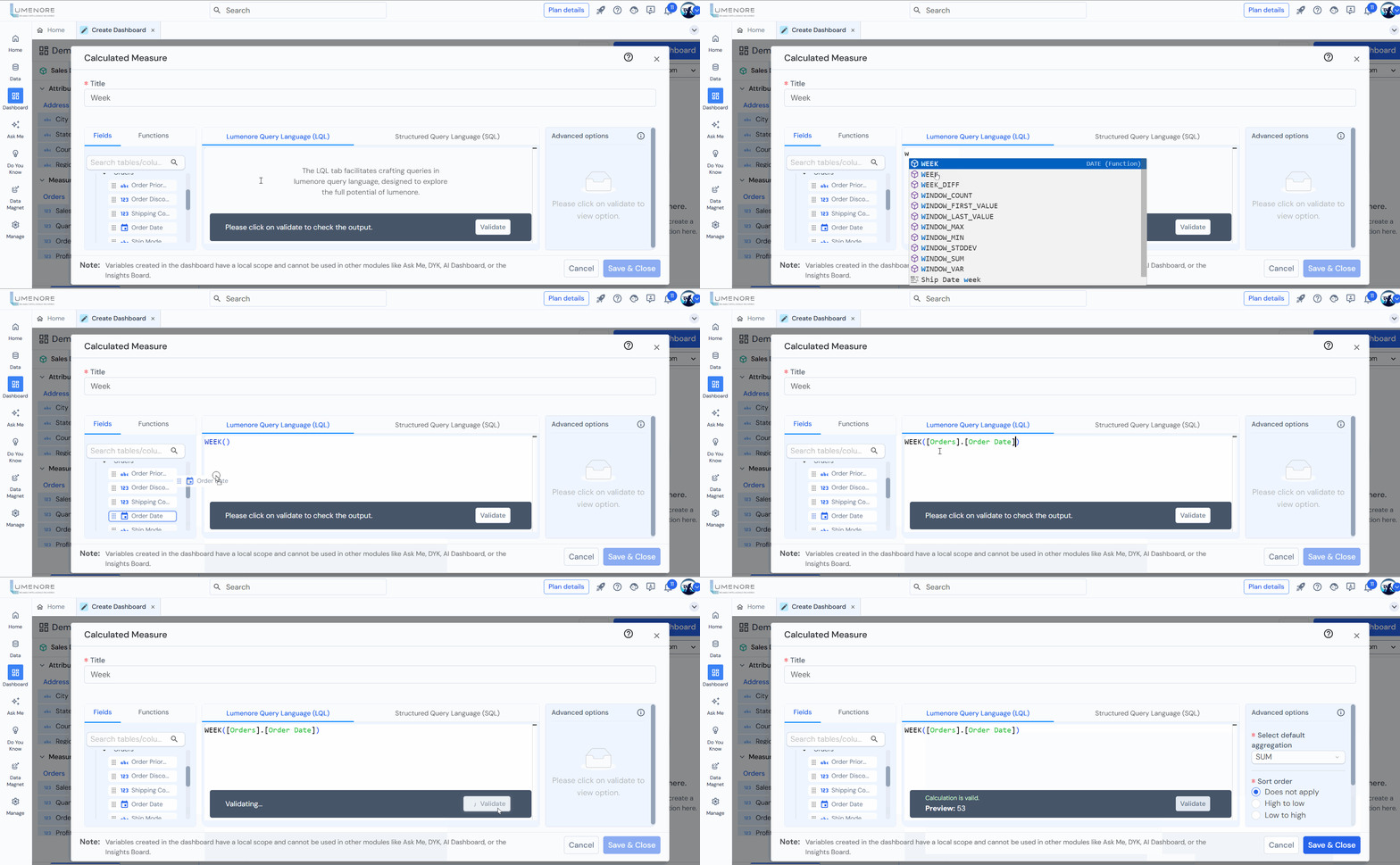
Example Queries:
- WEEK([Order Date week])
- WEEK([Ship Date week])
- WEEK(TO_DATE(‘20012023’, ‘YYYYMMDD’))
- WEEK(TO_DATE(‘20012023’, ‘MMYYYYDD’))
- WEEK(TO_DATE(‘20012023’, ‘DDYYYYMM’))
DAY
To extract the day of the month from a date or timestamp. Its purpose is to return the day as an integer.
Syntax- DAY(date attribute)

Example Queries:
- DAY([Order Date day])
- DAY([Ship Date day])
- DAY(TO_DATE(‘20012023’, ‘YYYYMMDD’))
- DAY(TO_DATE(‘20012023’, ‘MMYYYYDD’))
- DAY(TO_DATE(‘20012023’, ‘DDYYYYMM’))
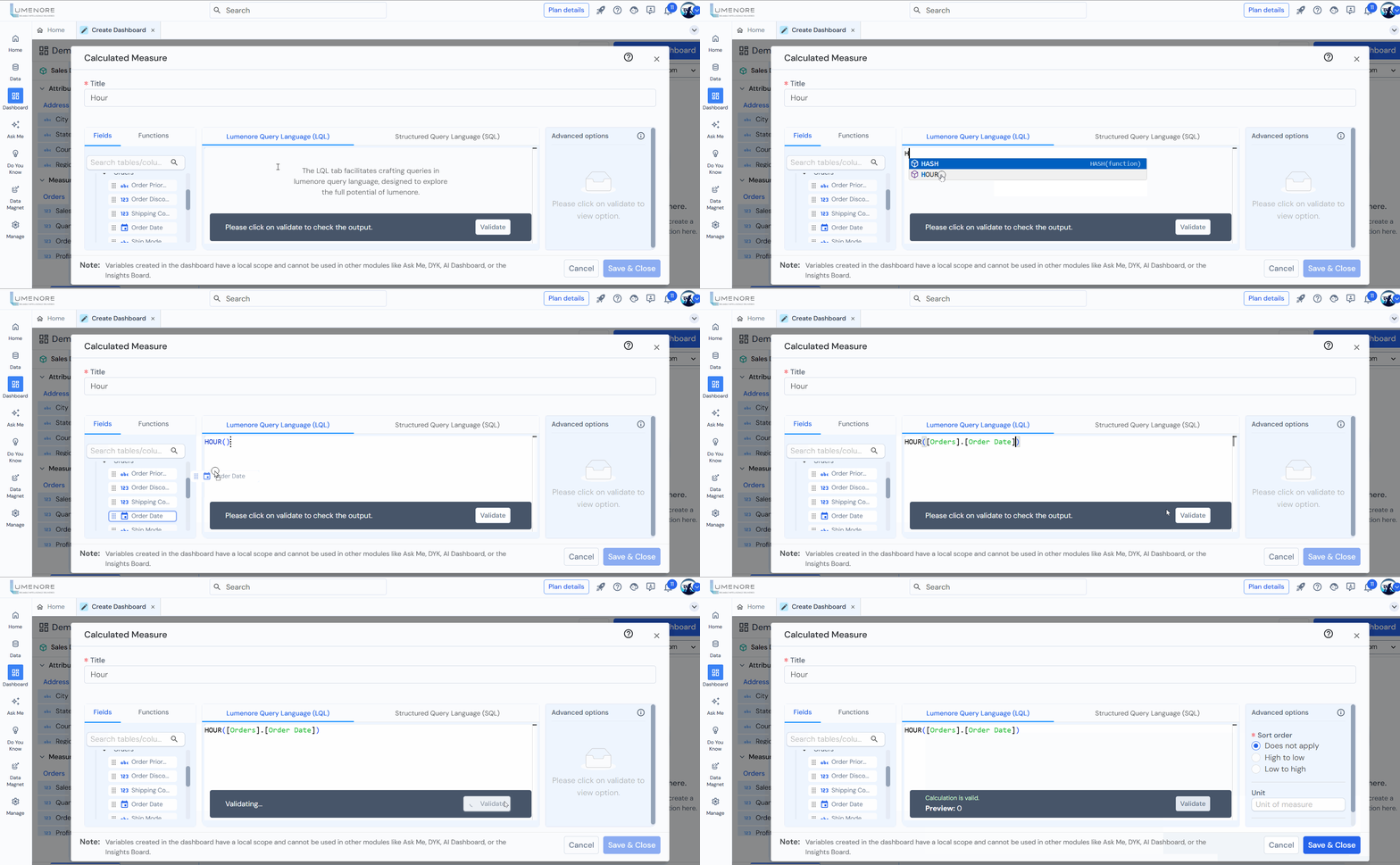
HOUR
To extract the hour component from a time or timestamp. Its primary purpose is to return the hour as an integer value.
Syntax – HOUR(date attribute)
Example Queries:
- HOUR([Order Date day])
- HOUR([Ship Date day])
- HOUR(TO_DATE(‘20012023’, ‘YYYYMMDD’))
- HOUR(TO_DATE(‘20012023’, ‘MMYYYYDD’))
- HOUR(TO_DATE(‘20012023’, ‘DDYYYYMM’))
MINUTE
To extract the minute component from a time or timestamp. Its primary purpose is to return the minute as an integer value.
Syntax – MINUTE(date attribute)
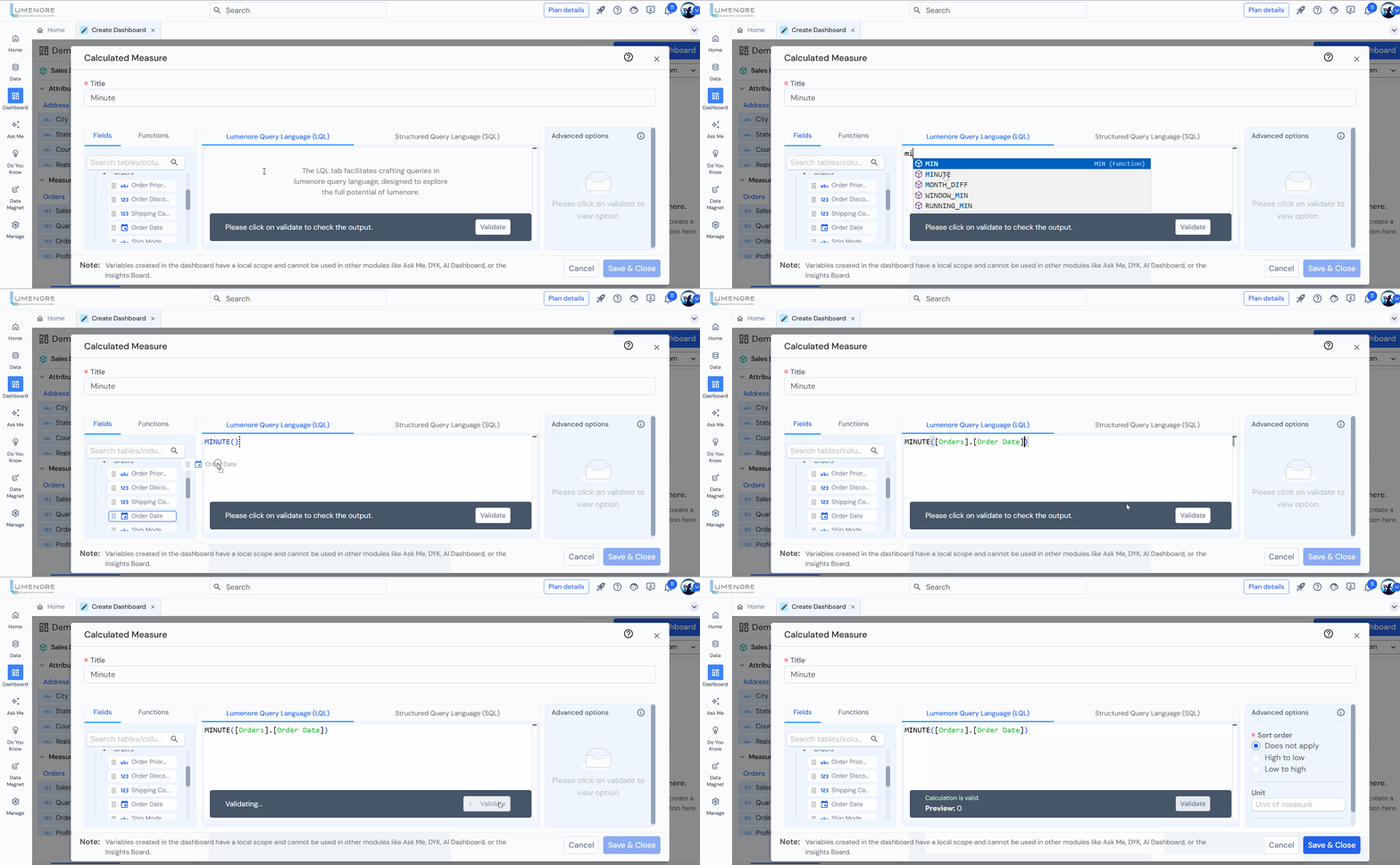
Example Queries:
- MINUTE([Order Date day])
- MINUTE([Ship Date day])
- MINUTE(TO_DATE(‘20012023’, ‘YYYYMMDD’))
- MINUTE(TO_DATE(‘20012023’, ‘MMYYYYDD’))
- MINUTE(TO_DATE(‘20012023’, ‘DDYYYYMM’))
SECOND
To extract the second component from a time or timestamp. Its primary purpose is to return the second as an integer value.
Syntax – SECOND(date attribute)

Example Queries:
- SECOND([Order Date day])
- SECOND([Ship Date day])
- SECOND(TO_DATE(‘20012023’, ‘YYYYMMDD’))
- SECOND(TO_DATE(‘20012023’, ‘MMYYYYDD’))
- SECOND(TO_DATE(‘20012023’, ‘DDYYYYMM’))
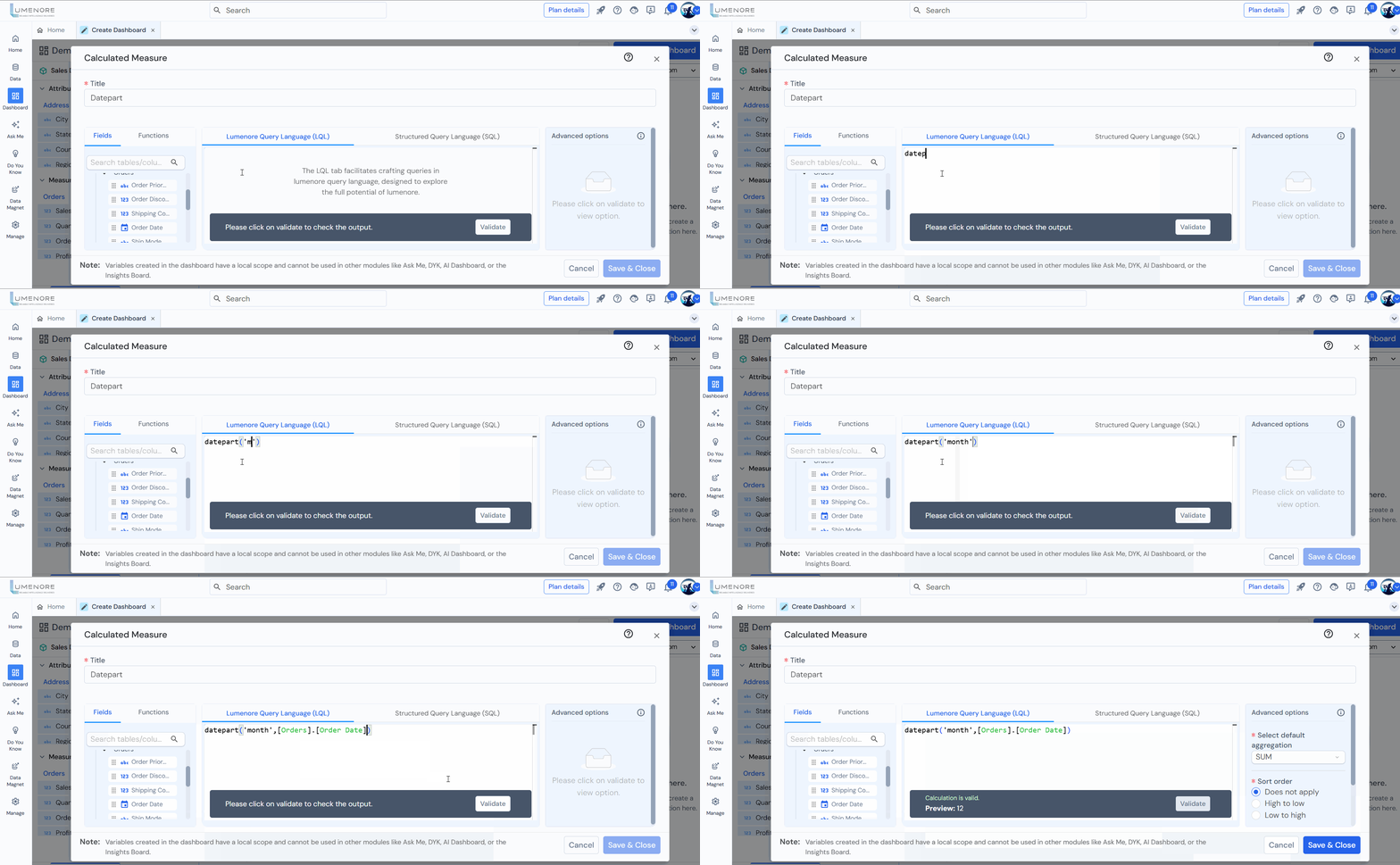
DATEPART
To extract a specific part (such as year, month, day, hour, minute, second, etc.) from a date or time value. It returns an integer representing the specified part of the date.
Syntax – DATEPART(string, date attribute)
TO_DATE
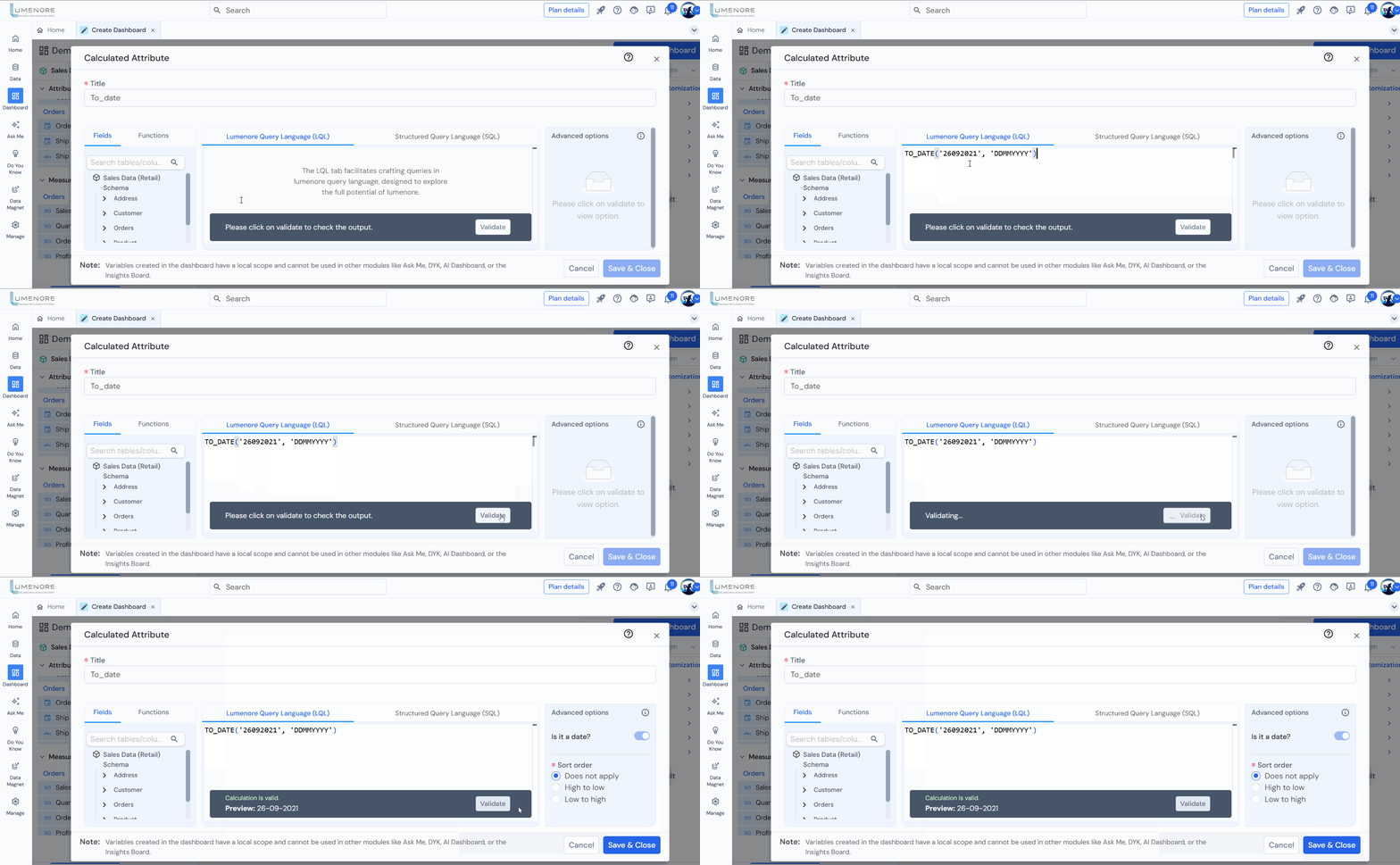
The TO_DATE function is commonly used in databases, such as Oracle, to convert a string representation of a date or timestamp into a proper date or timestamp data type.
Syntax – TO_DATE(numeric column, format)
Example Queries:
- TO_DATE(‘20012023’, ‘DDMMYYYY’)
- TO_DATE(‘20012023’, ‘MMDDYYYY’)
- TO_DATE(‘20012023’, ‘YYYYMMDD’)
- TO_DATE(‘02012020’, ‘MMDDYYYY’)
- TO_DATE(‘02012020’, ‘DDYYYYMM’
TIMESTAMPADD
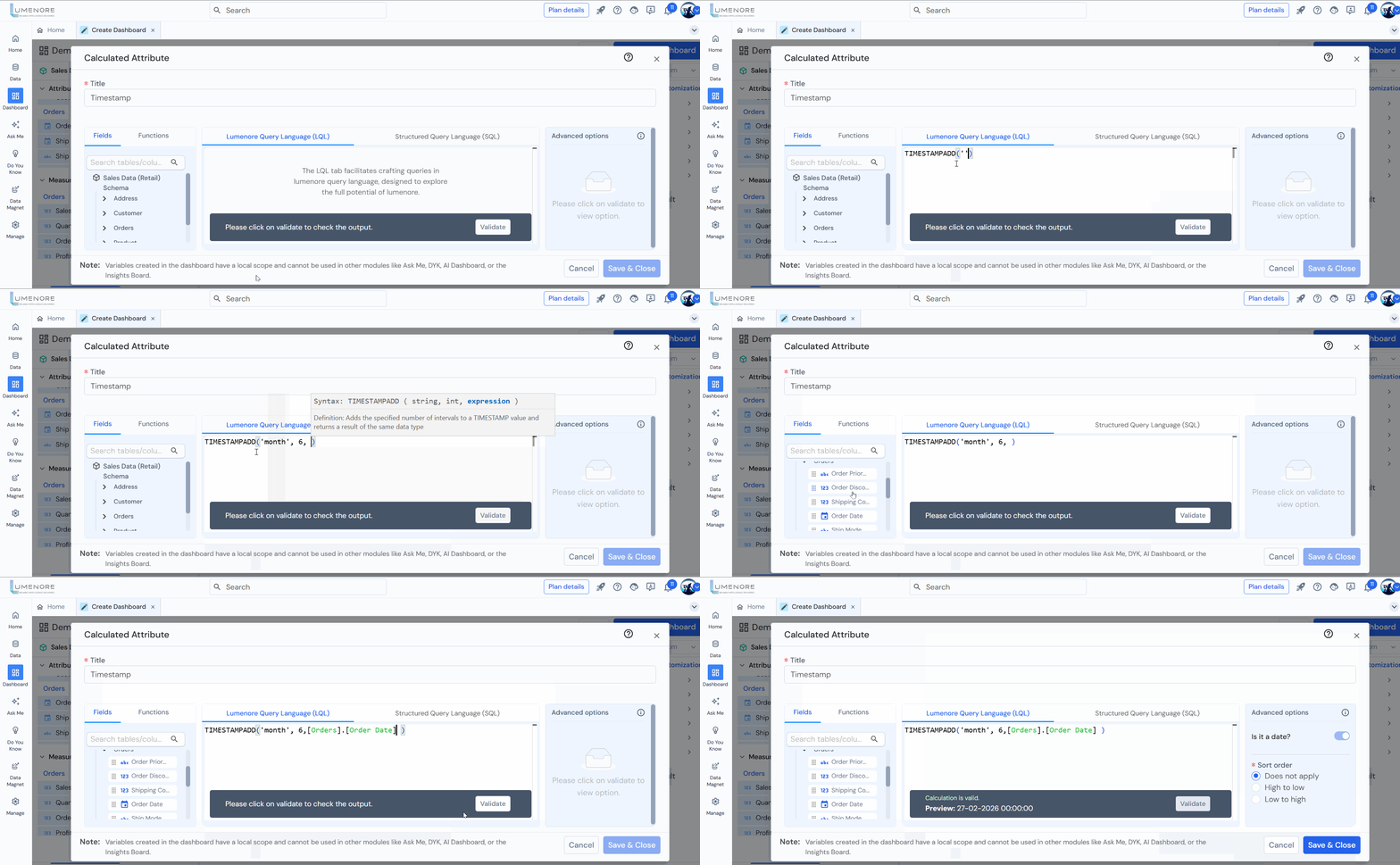
The TIMESTAMPADD function is a date and time manipulation function used in databases to add a specified time interval to a given timestamp or date.
Syntax – TIMESTAMPADD(date_string, int, date attribute)
Example: Here we are adding 6 months in order date.
Example Queries:
Adds 10 days to the order date.
- TIMESTAMPADD(‘day’, 10, [Retail].[Order Date])
- TIMESTAMPADD(‘MONTH’,2,[Orders].[Ship Date])
- TIMESTAMPADD(‘YEAR’, 1, [Orders].[Ship Date])
- TIMESTAMPADD(‘HOUR’, 5, [Orders].[Ship Date])
- TIMESTAMPADD(‘SECOND’, 10, [Orders].[Ship Date])
TIMESTAMPDIFF
The TIMESTAMPDIFF function is a date and time function used in databases to calculate the difference between two timestamps or dates.
Syntax – TIMESTAMPADD(date_string, date attribute, date attribute)

Example Queries:
- TIMESTAMPDIFF(‘DAY’, [Retail].[Order Date], [Retail].[Ship Date])
- TIMESTAMPDIFF(‘HOUR’, [Retail].[Order Date], [Retail].[Ship Date])
- TIMESTAMPDIFF(‘SECOND’, [Retail].[Order Date], [Retail].[Ship Date])
- TIMESTAMPDIFF(‘MINUTE’, [Retail].[Order Date], [Retail].[Ship Date])
