Custom function
CUSTOMSORT
Custom logic for sorting tailored to a particular requirement’s specific requirements. To sort attribute column w.r.t case condition or another attribute.
Syntax – CUSTOMSORT(attribute name, expr)
Example: Sorting regions in 1 and 0.
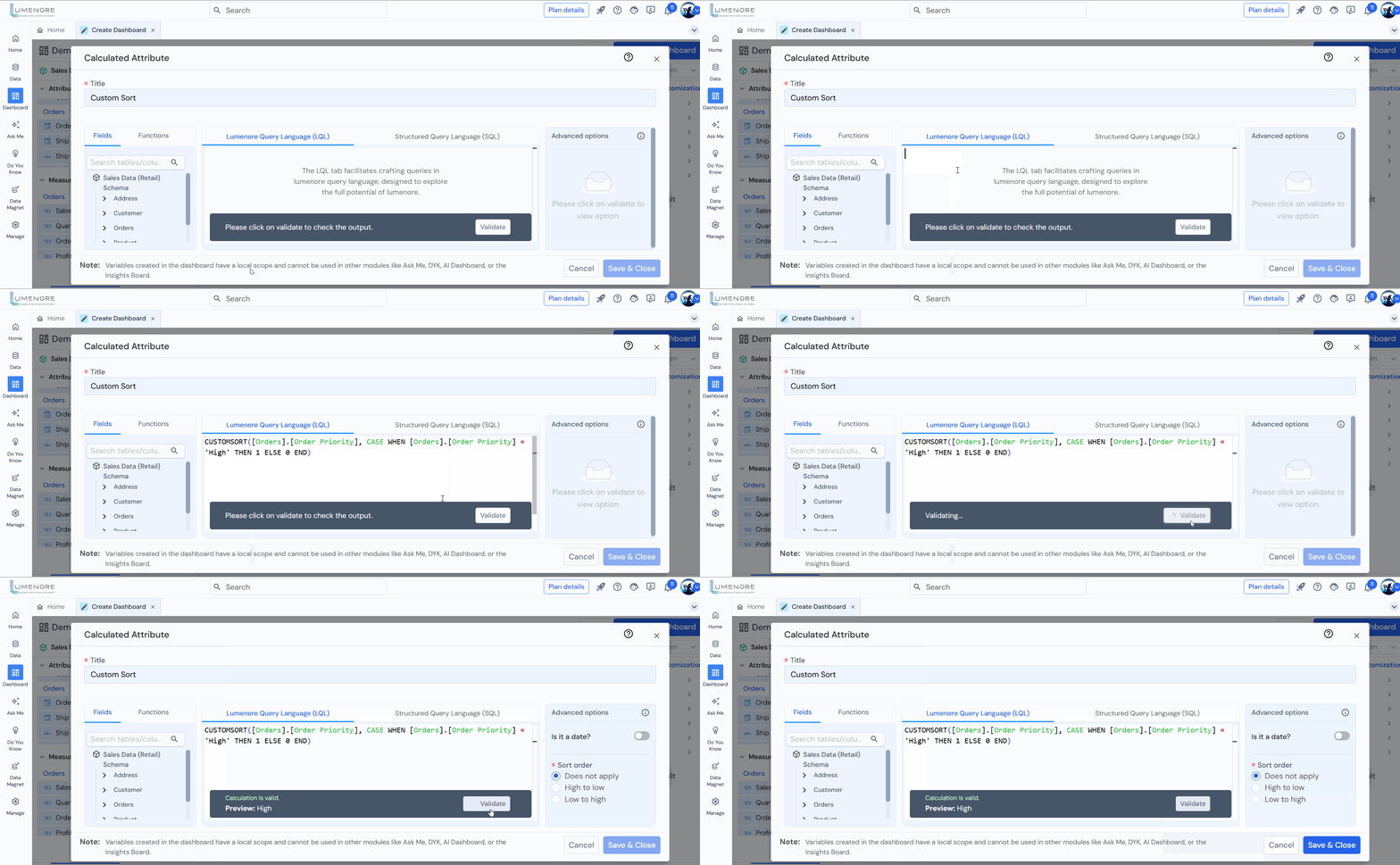
Example Queries:
- Sort orders by priority, placing ‘High’ priority first:
CUSTOMSORT([Retail].[Order Priority],
CASE WHEN [Retail].[Order Priority] = ‘High’ THEN 1 ELSE 0 END) - Sort customers by segment, prioritizing ‘Corporate’ first:
CUSTOMSORT([Retail].[Customer Segment],
CASE WHEN [Retail].[Customer Segment] = ‘Corporate’ THEN 1 ELSE 0 END) - Sort products by category, placing ‘Technology’ first:
CUSTOMSORT([Retail].[Category],
CASE WHEN [Retail].[Category] = ‘Technology’ THEN 1 ELSE 0 END) - Sort orders by shipping mode, prioritizing ‘Same Day’ first:
CUSTOMSORT([Retail].[Ship Mode],
CASE WHEN [Retail].[Ship Mode] = ‘Same Day’ THEN 1 ELSE 0 END) - Sort orders by country, prioritizing ‘United States’ first:
CUSTOMSORT([Retail].[Country],
CASE WHEN [Retail].[Country] = ‘United States’ THEN 1 ELSE 0 END) - Sort orders by sales, prioritizing sales greater than 1000 first:
CUSTOMSORT([Retail].[Sales],
CASE WHEN [Retail].[Sales] > 1000 THEN 1 ELSE 0 END)
CUSTOM DISPLAY
Related to a custom display functionality, particularly involving a “case when” statement. In database and programming contexts, a “case when” statement is often used for conditional logic.
Syntax – CUSTOM DISPLAY (attribute name, expr)
Example: Displaying regions in 1 and 0.
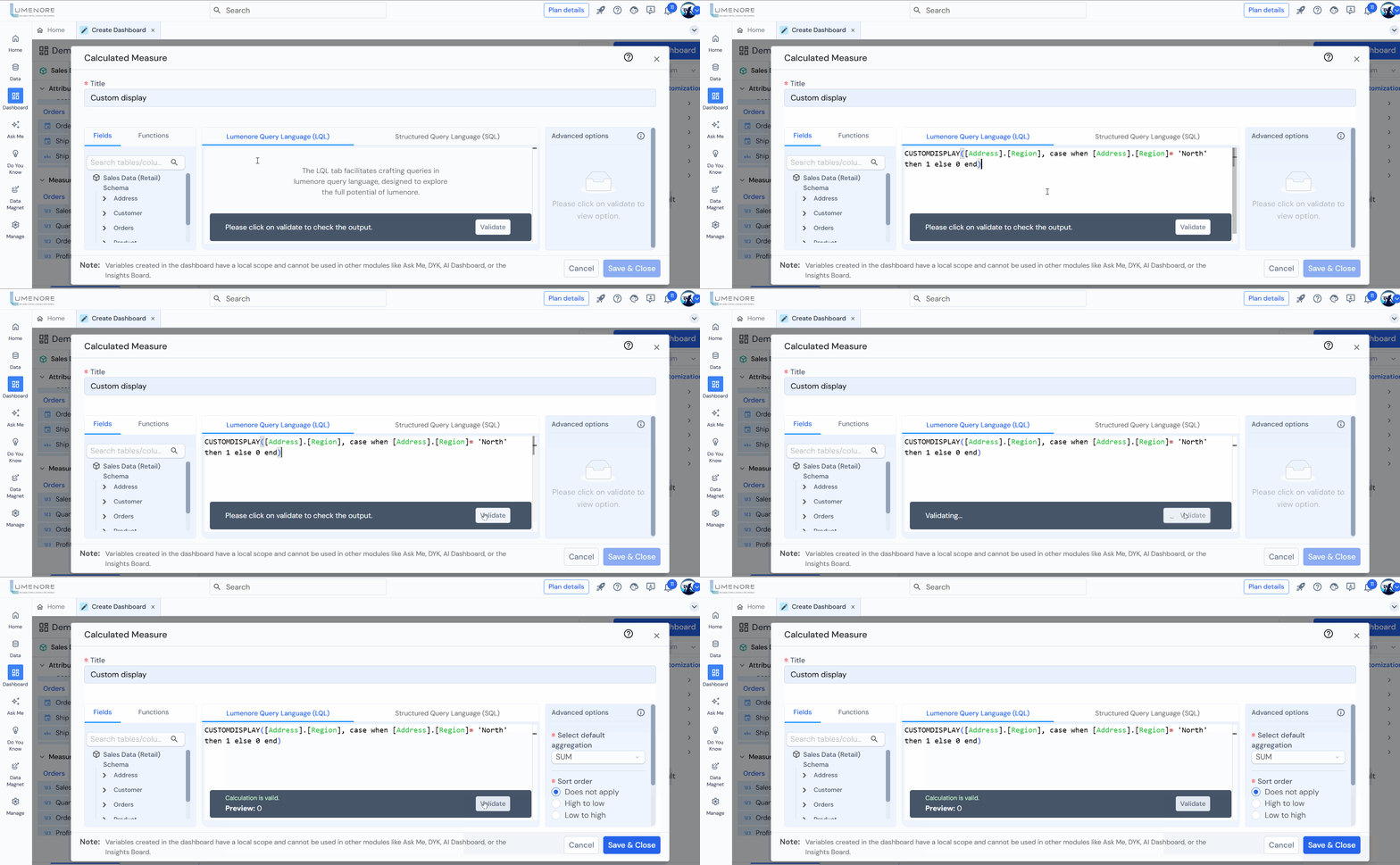
Example Queries:
- Display customer name and segment:
CUSTOMDISPLAY([Retail].[Customer Name],
CASE WHEN [Retail].[Customer Segment] = ‘Corporate’ THEN ‘Corporate Client’ ELSE ‘Regular Client’ END) - Display customer name with their region, prioritizing ‘East’ first:
CUSTOMDISPLAY([Customer].[Customer Name], CASE WHEN [Address].[Region] = ‘East’ THEN ‘Priority Region’ ELSE ‘Other Region’ END) - Display customer name and order priority, highlighting ‘Critical’ orders:
CUSTOMDISPLAY([Customer].[Customer Name], CASE WHEN [Order].[Order Priority] = ‘Critical’ THEN ‘High Priority’ ELSE ‘Normal Priority’ END) - Display customer ID with sales category (High or Low Sales):
CUSTOMDISPLAY([Customer].[Customer ID], CASE WHEN [Order].[Sales] > 1000 THEN ‘High Value Customer’ ELSE ‘Low Value Customer’ END) - Display customer name along with their shipping mode preference:
CUSTOMDISPLAY([Retail].[Customer Name], CASE WHEN [Retail].[Ship Mode] = ‘Same Day’ THEN ‘Urgent Shipper’ ELSE ‘Standard Shipper’ END)
